Inside React Core: Fiber, Lanes and the Scheduler — From setState to Pixels
Bài này có bản tiếng Việt. Đọc bản tiếng Việt →

Nguyen Hai Trinh • Senior Software Engineer @ SmileViet

This post doesn’t teach React. It opens the hood.
I’m writing for three groups. Mids, to understand why setState doesn’t run immediately, and why a hook inside an if breaks things. Seniors, to know when a re-render is unavoidable and when you caused it yourself. Leads, to have enough technical vocabulary when you have to choose between “add memo” and “fix the state model”.
Every function name here is a real name from the React source, in packages/react-reconciler, packages/scheduler and packages/react-dom. The sample code is simplified, and marked as simplified. It’s not the original.
This post is based on React 19. The Fiber + lanes + scheduler architecture described here is unchanged from React 18 to 19. React 19 adds APIs on the upper layer and doesn’t replace the machinery underneath. Where there’s a risk of drift between minor versions, I say so.
1. Three layers, three different rhythms of time
React isn’t one block. It’s three layers, and each has its own notion of time.
flowchart TD
    A["Event handler<br/>onClick, useEffect, fetch resolve"] --> B["Reconciler<br/>computes the new tree<br/>does NOT touch the DOM"]
    B --> C["Scheduler<br/>decides when to run<br/>and for how long"]
    C --> B
    B --> D["Commit<br/>mutates the real DOM"]
    D --> E["Host: react-dom<br/>setAttribute, appendChild..."]
    E --> F["Browser<br/>style, layout, paint, composite"]
    F --> G["useEffect runs<br/>AFTER paint"]

    style B fill:#1e3a5f,stroke:#38bdf8,color:#fff
    style C fill:#3b2f1e,stroke:#f59e0b,color:#fff
    style D fill:#3f1e2b,stroke:#fb7185,color:#fff
The three layers are:
- Reconciler (
react-reconciler): knows what the component tree looks like, and what the new tree has to be. This layer has no idea what the DOM is. - Scheduler (
scheduler): knows what’s urgent and what isn’t, and cuts long work into short slices. - Host (
react-domin the browser): knows whatdocument.createElementis.
This layering is why react-native, react-dom/server and react-three-fiber share one reconciler. Changing the host means changing the bottom layer and leaving the top two alone.
A question I use to tell someone who understands React from someone who memorized the API: is the render phase allowed to touch the DOM? No. And not because “React forbids it” as a moral rule. The render phase can run many times, run again after being interrupted, or be thrown away entirely. Touch the DOM there and a side effect can happen several times, or happen and never get undone.
2. Fiber: the unit of work
A Fiber is a JavaScript object describing one node in the tree. But how it describes it is the part worth discussing.
// Simplified from ReactFiber.js — many fields unrelated to this post removed
type Fiber = {
  tag: WorkTag;              // FunctionComponent, HostComponent, SuspenseComponent...
  type: any;                 // the component/function itself
  stateNode: any;            // the real DOM node (for HostComponent) or the class instance

  return: Fiber | null;      // parent
  child: Fiber | null;       // first child
  sibling: Fiber | null;     // next sibling

  alternate: Fiber | null;   // the counterpart — the basis of double buffering

  pendingProps: any;         // props for this render
  memoizedProps: any;        // props from the previous render
  memoizedState: any;        // for function components: the linked list of hooks
  updateQueue: any;

  flags: Flags;              // work to do on this fiber itself at commit
  subtreeFlags: Flags;       // merged flags of the whole subtree — to know whether to go deeper
  deletions: Fiber[] | null; // children being deleted

  lanes: Lanes;              // updates pending on this fiber itself
  childLanes: Lanes;         // updates pending somewhere in the subtree
};
2.1. Why a linked list and not a recursive tree
The old way (the stack reconciler) walked the tree with recursion. Recursion means the JavaScript call stack holds the traversal state, and a call stack can’t be paused and resumed. Abandon it midway and you lose everything.
Fiber switched to pointers: parent, first child, next sibling. Traversal becomes a while loop with three variables. The state lives in your own variables, so stopping in the middle, handing control back to the browser, then coming back to continue is perfectly ordinary.
// Simplified from ReactFiberWorkLoop.js
function workLoopConcurrent() {
  while (workInProgress !== null && !shouldYield()) {
    performUnitOfWork(workInProgress);
  }
}
One while line, two conditions. That’s the entire time-slicing mechanism at the reconciler layer. The “for how long” part is answered by shouldYield(), and that belongs to the Scheduler layer.
2.2. Double buffering: current and workInProgress
React keeps two trees at once. The current tree is what’s on screen right now. The workInProgress tree is the one being built.
Every fiber in the new tree has an alternate pointer back to the matching fiber in the old tree. When commit finishes, root.current is reassigned to the new tree. The two trees swap roles.
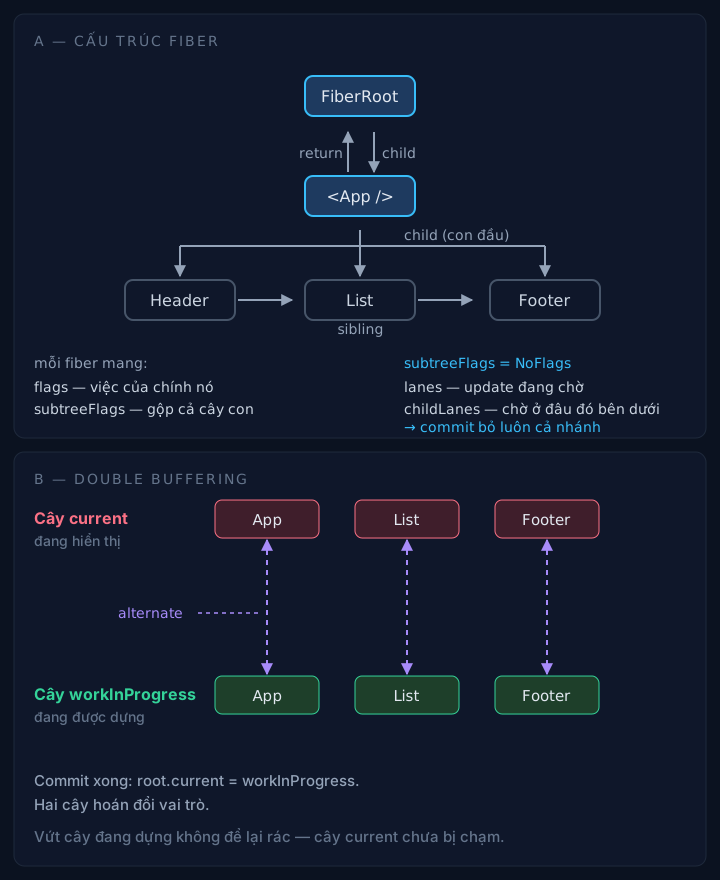
Two parallel trees, linked by alternate. When commit finishes, root.current flips direction.
So a render can be thrown away without leaving garbage: everything a render creates lives in the workInProgress tree, and the current tree hasn’t been touched. Discard the workInProgress tree and you’re done. No rollback, no undo log.
2.3. flags and subtreeFlags
A fiber doesn’t describe “what the tree looks like”. It describes “what needs to be done”. Each fiber carries a flags bitmask recording its own work, and subtreeFlags merges the work of its whole subtree.
Thanks to subtreeFlags, commit doesn’t have to walk the whole tree. Hit a fiber with subtreeFlags === NoFlags and it skips the entire branch, since there’s nothing to do below. In a large app, that’s the difference between walking 50,000 fibers and walking 200.
The names of the bits have changed across versions (effectTag in React 16, flags from React 17, and later merged masks like MutationMask, LayoutMask, PassiveMask). The substance stayed the same: this is a work table, not a description of state.
3. Lanes: the priority system
The part that changed the most since React 18, and also the part fewest people read closely.
React has to answer one question: of 5 pending updates, which goes first? Before React 17, the answer used expirationTime, one expiry timestamp per update. That approach had problems: it’s linear, can’t group, and can’t express “these two updates must run together”.
From React 18, the answer is lanes: a 31-bit bitmask. Each bit is a lane. TotalLanes = 31.
| Lane | Used for |
|---|---|
SyncLane | Discrete events: click, keypress, flushSync |
InputContinuousLane | Continuous interaction: scroll, drag, mousemove |
DefaultLane | Plain setState, updates that don’t come from an event |
TransitionLanes | 16 dedicated lanes for startTransition, useDeferredValue |
RetryLanes | Retrying after Suspense has suspended |
IdleLane | Work that can wait |
OffscreenLane | Hidden trees (<Activity>, prerender) |
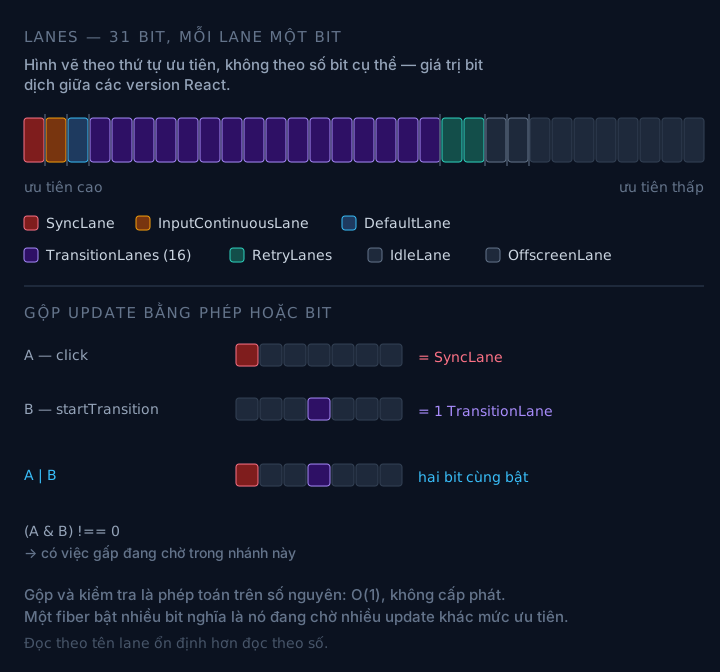
Each lane is a bit. Merging updates is the | operation. Checking for urgent work is the & operation.
3.1. Why a bitmask and not an array
Because bit operations are O(1) and allocate no memory.
// Simplified
function mergeLanes(a: Lanes, b: Lanes): Lanes {
  return a | b;
}

function includesSomeLane(a: Lanes, b: Lanes): boolean {
  return (a & b) !== NoLanes;
}

function removeLanes(set: Lanes, subset: Lanes): Lanes {
  return set & ~subset;
}
A fiber can be waiting on a SyncLane update and a transition update at the same time. Just turn on two bits. Checking “is there anything urgent” across 50,000 fibers is one & on an integer, not a loop over an array of updates.
This sounds like a small detail. It isn’t. It’s what makes “scan the whole tree to see if anything is urgent” cheap, and that’s why getNextLanes can be called so often.
3.2. From event to lane
When you call setState, React has to decide which lane that update belongs to. The answer depends on the context it’s running in, not on setState itself.
flowchart TD
    A["setState / dispatchSetState"] --> B{"Which context are we in?"}
    B -->|"discrete event handler"| C["SyncLane<br/>highest priority"]
    B -->|"continuous event: scroll, drag"| D["InputContinuousLane"]
    B -->|"inside startTransition"| E["one of the TransitionLanes"]
    B -->|"inside useEffect / promise / timeout"| F["DefaultLane"]
    B -->|"useDeferredValue"| G["TransitionLane<br/>downgraded from the current lane"]
    C --> H["requestUpdateLane()"]
    D --> H
    E --> H
    F --> H
    G --> H
    H --> I["markRootUpdated(root, lane)<br/>root.pendingLanes |= lane"]
// Simplified from ReactFiberWorkLoop.js
function requestUpdateLane(fiber: Fiber): Lane {
  const updateLane = requestUpdateLaneFromEventPriority();
  if (updateLane !== NoLane) return updateLane;

  // ...
  return DefaultLane;
}
The same setState, placed in onClick versus placed in setTimeout, gets two different lanes. That’s why “React batches updates” sounds like fixed behavior but in practice depends entirely on where you call it.
3.3. pendingLanes, childLanes and the problem of finding work
The root keeps pendingLanes: every lane waiting anywhere in the tree. But the root needs to know which branch to descend into, or every small update would have to walk the whole tree to find it.
That’s the job of childLanes on the fiber. When an update is marked, markUpdateLaneFromFiberToRoot walks upward from that fiber to the root and, along the way, turns on the matching bit in each ancestor’s childLanes.
The result: beginWork only has to compare childLanes against the root’s lane. If they don’t intersect, it bails out of the whole branch.
sequenceDiagram
    participant U as Update at a leaf fiber
    participant P as Ancestors
    participant R as FiberRoot
    U->>P: markUpdateLaneFromFiberToRoot
    Note over P: turn on the bit in childLanes<br/>of each ancestor along the way
    P->>R: reach the root
    R->>R: pendingLanes |= lane
    R->>R: ensureRootIsScheduled(root)
3.4. Preventing starvation
A SyncLane branch that keeps getting switched on would block a waiting transition forever. React handles this by marking a lane that’s been starved too long as “expired”, and then getNextLanes pulls it forward to run first, even when something more urgent just arrived.
This mechanism (markStarvedLanesAsExpired and the entangledLanes variable from React 18 on) is why in practice you don’t see a startTransition hang forever while the user keeps typing. Without it, “low priority” would mean “may never run”.
4. Scheduler: slicing the main thread into 5ms pieces
The reconciler knows what to do. The Scheduler knows when to stop.
The browser has one main thread. A while loop running 300ms to compute a new tree means 300ms where nobody can handle a click, scroll, or repaint. The Scheduler exists to stop that.
4.1. shouldYieldToHost
// Simplified from Scheduler.js
const frameInterval = 5;

function shouldYieldToHost(): boolean {
  const timeElapsed = getCurrentTime() - startTime;
  if (timeElapsed < frameInterval) {
    // Haven't blocked the main thread long enough, no need to yield yet
    return false;
  }
  // ...
  return true;
}
frameInterval = 5 milliseconds. Every 5ms, the reconciler has to ask itself “is it time to yield”, and if so, leave the loop and hand control back to the browser.
Five milliseconds, not sixteen (one frame at 60fps), is a deliberate number. It leaves room for everything else: if React used the full 16ms there’d be nothing left for style, layout and paint, and the frame would still drop.
4.2. Why MessageChannel and not setTimeout
After yielding, React needs to be called back the moment the main thread is free. setTimeout(fn, 0) sounds reasonable, but browsers clamp nested delays to at least 4ms after a few iterations, and throttle timers in background tabs. That means every yield would cost an extra 4ms of dead time.
MessageChannel has no such limit. Posting a message to port2 makes port1.onmessage run in a clean macrotask, right after the main thread frees up, with no clamp threshold in between.
// Simplified from Scheduler.js
const channel = new MessageChannel();
const port = channel.port2;
channel.port1.onmessage = performWorkUntilDeadline;
You don’t need to know this to write React. But it explains a strange observation: why transition updates run “smoothly” without showing up in a setTimeout stack trace when you profile.
4.3. ensureRootIsScheduled: sync or concurrent
After every update, React calls ensureRootIsScheduled(root). This is where it decides whether the update gets sliced.
flowchart TD
    A["ensureRootIsScheduled(root)"] --> B["nextLanes = getNextLanes(root)"]
    B --> C{"does nextLanes include<br/>SyncLane?"}
    C -->|Yes| D["scheduleSyncCallback<br/>→ scheduleMicrotask<br/>runs fully in one tick, NO slicing"]
    C -->|No| E["scheduleCallback(SchedulerPriority,<br/>performConcurrentWorkOnRoot)"]
    E --> F["workLoopConcurrent<br/>while (... && !shouldYield())"]
    F --> G{"5ms used up?"}
    G -->|Yes| H["hand control to the browser<br/>reschedule via MessageChannel"]
    G -->|No| F
    H --> F

    style D fill:#3f1e2b,stroke:#fb7185,color:#fff
    style F fill:#1e3a5f,stroke:#38bdf8,color:#fff
The important thing here: not every render is sliced. An update on SyncLane runs to completion in one tick, with no yielding. Only updates on lower lanes go down the concurrent path and can be interrupted.
So “React 18 renders asynchronously” is half wrong. The default for setState in an event handler is still to run synchronously to the end, then commit. It’s startTransition that opens the door to being interrupted.
5. The render loop: beginWork and completeWork
When there’s work to do, the reconciler runs performUnitOfWork, and each unit is one fiber. Exactly two functions take turns there.
flowchart TD
    S["beginWork(fiber)"] --> T{"Can we bail out?"}
    T -->|Yes| U["return null<br/>don't go deeper into this branch"]
    T -->|No| V{"what is fiber.tag?"}
    V -->|FunctionComponent| W["renderWithHooks<br/>run the component, get children"]
    V -->|HostComponent| X["updateHostComponent"]
    V -->|Other| Y["the matching updateXxx"]
    W --> Z["reconcileChildren<br/>diff children against old child fibers"]
    X --> Z
    Y --> Z
    Z --> AA["return the first child fiber<br/>to keep going down"]
    AA --> S
    U --> AB{"Any sibling left?"}
    AB -->|Yes| S
    AB -->|No| AC["completeUnitOfWork<br/>go up via completeWork"]
    AC --> AD["completeWork(fiber)<br/>create/update DOM instance,<br/>merge flags into the parent's subtreeFlags"]
    AD --> AB

    style W fill:#1e3a5f,stroke:#38bdf8,color:#fff
    style AD fill:#3f1e2b,stroke:#fb7185,color:#fff
beginWorkgoes down. For a function component, it callsrenderWithHooks, meaning it runs your function and takes the JSX it returns. ThenreconcileChildrendiffs the new children against the old child fibers.completeWorkgoes up. It creates or updates the DOM instance for host components, and merges the child’sflagsinto the parent’ssubtreeFlags.
completeWork is worth noticing. It doesn’t put DOM into the live tree right away. It creates the instance and attaches it to the fiber, so attaching to the document only happens at commit. That way the whole render process still never touches the live DOM tree.
5.1. Bailout: three conditions, not one
Bailout is when React decides not to descend into a branch. The condition isn’t just “props didn’t change”.
// Simplified from ReactFiberBeginWork.js
function beginWork(current: Fiber | null, workInProgress: Fiber, renderLanes: Lanes) {
  if (current !== null) {
    const oldProps = current.memoizedProps;
    const newProps = workInProgress.pendingProps;

    if (oldProps === newProps && !includesSomeLane(renderLanes, workInProgress.type)) {
      // identical props (reference comparison, not deep-equal) and this fiber has no pending update
      // -> try to bail out
      return bailoutOnAlreadyFinishedWork(current, workInProgress, renderLanes);
    }
  }
  // ...
}
Three conditions for a branch to be skipped entirely:
propsare equal by reference:oldProps === newProps. Not deep equal. This is the root of a whole later consequence: creating a new object/array on every render makes this condition always false.- That fiber has no pending update on itself (
workInProgress.lanes). - The subtree has no pending update either (
childLanesdoesn’t intersectrenderLanes). If it does,bailoutOnAlreadyFinishedWorkstill goes down.
The third condition is where many people get it wrong. A bailout at a component does not mean its whole subtree doesn’t render. It only means that component doesn’t render. If a grandchild has an update, React still passes through to reach it.
5.2. Why render has to be pure
Now the reason is clear, no need to take it on faith.
renderWithHooks can be called many times for the same component within one update. Each interruption or discard means another run. The result of an earlier run may be thrown away entirely. If your function writes to an outside variable, sends a request, or increments a counter in module scope, then the number of executions is undefined, and there’s nothing to roll back.
In a small app, render almost always runs exactly once, so bugs like this lie dormant. They only blow up with transitions, Suspense, or StrictMode’s double-invoke turned on.
6. Hooks from the inside
Hooks aren’t magic APIs. They’re a linked list attached to the fiber.
6.1. memoizedState is a linked list
For a function component, fiber.memoizedState is a pointer to the first hook. Each hook has a next pointing to the following one.
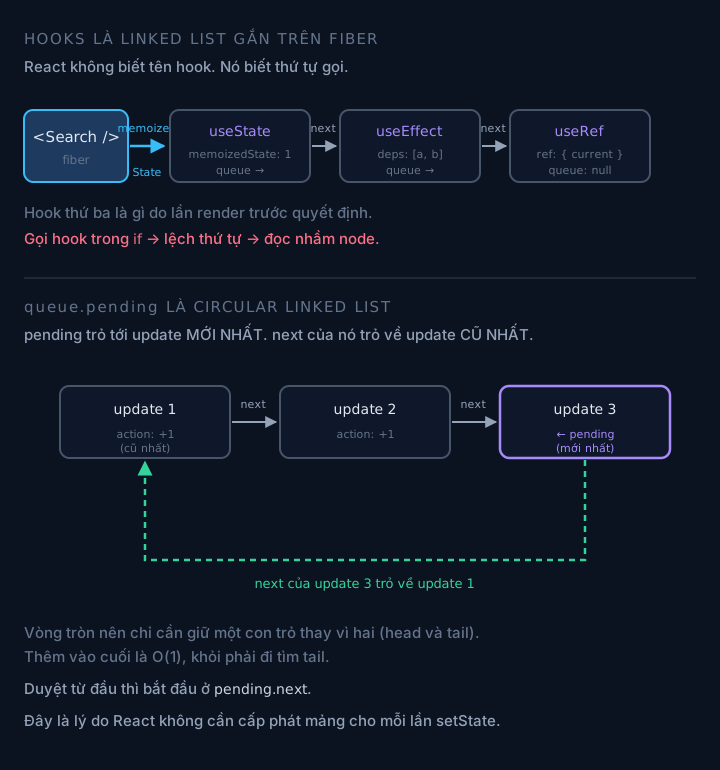
Each hook is a node. queue.pending is a circular list: the next pointer of the last node points back to the first.
// Simplified from ReactFiberHooks.js
type Hook = {
  memoizedState: any;   // current value of this hook
  baseState: any;       // state before the whole queue was processed
  baseQueue: Update | null;
  queue: UpdateQueue | null;  // pending updates
  next: Hook | null;
};
That’s the entire reason for “don’t call hooks conditionally”. React has no names for hooks. It doesn’t know which one is the third useState. It knows the call order. What the third hook is this render is determined by what the third hook was last render.
Put useState inside an if and the order shifts between two renders. From then on, every hook reads the wrong node, and React throws “Rendered fewer hooks than expected”, if you’re lucky.
6.2. updateQueue is a circular linked list
Few people know this one, and it’s rather neat.
// Simplified from ReactFiberHooks.js
type UpdateQueue<S, A> = {
  pending: Update<S, A> | null;  // points to the NEWEST update, not the oldest
  lanes: Lanes;
  dispatch: ((action: A) => void) | null;
  lastRenderedReducer: ((s: S, a: A) => S) | null;
  lastRenderedState: S | null;
};
The newest update’s update.next points back to the oldest update. The list is a circle.
The benefit: you only need to keep one pointer instead of two (head and tail). To traverse from the start, go from pending.next. To append at the end, insert after pending, exactly O(1), no need to find the tail.
6.3. dispatchSetState and the eager-state shortcut
This answers a very common question: “why doesn’t setState with the same value re-render?”
// Simplified from ReactFiberHooks.js
function dispatchSetState(fiber, queue, action) {
  const lane = requestUpdateLane(fiber);

  const update = { lane, action, hasEagerState: false, eagerState: null, next: null };

  if (isRenderPhaseUpdate(fiber)) {
    enqueueRenderPhaseUpdate(queue, update);
  } else {
    const alternate = fiber.alternate;
    // Only try to compute ahead of time when the fiber has no pending updates
    if (fiber.lanes === NoLanes && (alternate === null || alternate.lanes === NoLanes)) {
      const lastRenderedReducer = queue.lastRenderedReducer;
      const currentState = queue.lastRenderedState;
      const eagerState = lastRenderedReducer(currentState, action);

      update.hasEagerState = true;
      update.eagerState = eagerState;

      if (is(eagerState, currentState)) {
        // Identical to the current value -> nothing to schedule at all
        return;
      }
    }
    // ...
    scheduleUpdateOnFiber(fiber, lane);
  }
}
Three things worth noting here:
- React actually calls your reducer function on the spot, before scheduling. For
useState, the reducer is just “return the new value”. That’s why passing a function tosetState(setX(prev => prev + 1)) matters more than being a style tip. - The shortcut only opens when the fiber has no pending updates. If updates are already queued, React can’t compute ahead, because the result depends on the order of the earlier updates.
- The comparison uses
Object.is, not===. The difference is exactlyNaNand+0/-0.
A practical consequence: setState with a new object always differs by reference, so it always re-renders, even if the contents are identical. That’s the root of a lot of “why does this component keep rendering”.
6.4. Bailout at the hooks layer
If the eager-state shortcut doesn’t open, React still has one more layer: when rendering again, updateReducer notices this update has an eagerState equal to the current state and an unchanged lane, keeps the hook as is, and bailoutHooks marks the fiber as not needing a re-render.
So there are two layers blocking a pointless re-render: one at dispatch time, one at render time. If you see a component still re-render after setState with the same value, it’s usually because:
- The new value differs by reference (a freshly created object/array/function)
- Another update is pending on the same fiber
- The parent rendered and the props are a new object
Only the third case needs memo. The first two are state model bugs, not performance problems.
7. Commit: three phases, three levels of risk
The render phase can run many times. The commit phase runs exactly once, and isn’t allowed to fail midway.
flowchart TD
    R["renderRootSync / renderRootConcurrent<br/>the workInProgress tree is done"] --> A1
    subgraph C["commitRootImpl — RUNS ONCE, NO SLICING"]
      direction TB
      A1["1. commitBeforeMutationEffects<br/>getSnapshotBeforeUpdate<br/>schedule useEffect (passive)"] --> A2
      A2["2. commitMutationEffects<br/>insert/delete/update the real DOM<br/>detach old refs<br/>useLayoutEffect cleanup"] --> A3
      A3["3. commitLayoutEffects<br/>attach new refs<br/>useLayoutEffect runs<br/>componentDidMount/Update"]
    end
    A3 --> SW["root.current = finishedWork<br/>swap current ← workInProgress"]
    SW --> P["Browser paint"]
    P --> PE["flushPassiveEffects<br/>useEffect runs AFTER paint"]

    style C fill:#2a1e3f,stroke:#a78bfa,color:#fff
    style P fill:#1e3f2a,stroke:#34d399,color:#fff
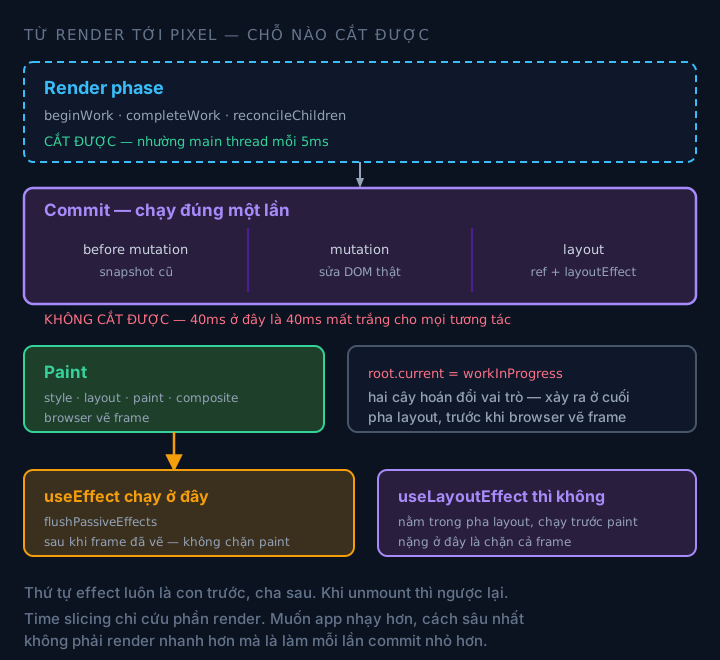
The three commit phases run back to back without yielding. The only window React has to interrupt is before entering commit.
7.1. The point of no return
All of commit runs synchronously. There’s no shouldYield() in it. Once it enters commitMutationEffects, React has to go all the way, because the real DOM tree is in a half-finished state between two versions.
So when you measure and see 40ms inside commit, that is not something that gets sliced. That’s 40ms lost outright for every interaction. Time slicing rescues the render phase, not commit.
So “optimizing React”, in the deepest sense, isn’t making render faster. It’s making each commit smaller. Splitting state, splitting components, moving heavy work out of render: all of it aims to reduce the number of DOM nodes touched in a single commit.
7.2. Effect order: children before parents
Both layout effects and passive effects run from child up to parent. That’s counterintuitive.
sequenceDiagram
    participant P as Parent
    participant C as Child
    participant GC as Grandchild
    Note over P,GC: MOUNT — child first, parent after
    GC->>GC: useLayoutEffect (grandchild)
    C->>C: useLayoutEffect
    P->>P: useLayoutEffect (parent)
    Note over P,GC: AFTER PAINT
    GC->>GC: useEffect (grandchild)
    C->>C: useEffect
    P->>P: useEffect (parent)
    Note over P,GC: UNMOUNT — the reverse, parent first
    P->>P: cleanup (parent)
    C->>C: cleanup
    GC->>GC: cleanup (grandchild)
The reason children run first on mount: when the parent’s effect runs, it may need the children to be ready. For example, the parent measures the total height of its children. It’s also why you can’t count on a child’s ref in the parent’s useLayoutEffect if the child mounts later.
On unmount it’s the reverse: cleanup runs from the parent down. Consistent with the order for tearing down resources: release the outer thing first.
7.3. Why useEffect runs after paint and useLayoutEffect doesn’t
useLayoutEffect lives in commitLayoutEffects, meaning before the browser paints the frame. It runs synchronously and blocks paint.
useEffect is scheduled in commitBeforeMutationEffects and only runs in flushPassiveEffects, after the frame has been painted. It doesn’t block paint.
// Simplified
// Use useLayoutEffect when: you need to measure the DOM before the user sees it
useLayoutEffect(() => {
  const height = ref.current.getBoundingClientRect().height;
  setHeight(height); // re-renders before paint -> no flicker
}, []);

// Use useEffect when: you don't need to block paint
useEffect(() => {
  const id = setInterval(tick, 1000);
  return () => clearInterval(id);
}, []);
If useLayoutEffect holds heavy work, you’re blocking paint, and no time slicing can save you, because this is commit. If useEffect holds work that must finish before the user sees something, you’ll see flicker.
8. Concurrent: interrupting, discarding, and tearing
By now all the pieces fit together.
8.1. When React discards render results
React discards the workInProgress tree it’s building when a higher-priority lane arrives midway. No undo needed, because the current tree hasn’t been touched.
stateDiagram-v2
    [*] --> RenderSync
    RenderSync --> Computing: beginWork / completeWork
    Computing --> Committing: done, not interrupted
    Committing --> Painted: DOM mutate + paint
    Painted --> [*]

    Computing --> Interrupted: new SyncLane arrives
    Interrupted --> Computing: restart from the root with the higher lane
    Interrupted --> Discarded: nobody is waiting on the old lane anymore
    Discarded --> [*]

    note right of Interrupted
        The workInProgress tree is dropped
        The current tree was never touched
        -> no rollback needed
    end note
The price: a discarded tree means the work spent building it is discarded too. If your transition keeps getting interrupted, you’re rendering more times, not fewer. Time slicing isn’t free. It buys UI responsiveness with CPU.
8.2. Tearing and useSyncExternalStore
There’s a kind of bug that concurrent rendering creates, and only concurrent does.
Say you read a variable outside React (a hand-written store, for example) in two components. If render is interrupted between those two components, and the store changes value while interrupted, then the first component renders with the old value and the second with the new one. In the same commit, two different versions of data on screen. That’s tearing.
sequenceDiagram
    participant R as Reconciler
    participant A as Component A
    participant S as External store
    participant B as Component B
    R->>A: render (reads store = 1)
    Note over R: INTERRUPTED — yields the main thread
    S->>S: store updates to 2
    R->>B: render (reads store = 2)
    Note over A,B: A shows 1, B shows 2 — same frame -> TEARING
React prevents this with useSyncExternalStore. This hook doesn’t just subscribe. It re-checks the value right before commit:
// Simplified from useSyncExternalStore
// If the snapshot changed since render started -> re-render synchronously on SyncLane
function handleStoreChange() {
  if (checkIfSnapshotChanged(inst)) {
    forceStoreRerender(fiber);
  }
}
That update is forced down to SyncLane. React deliberately gives up time slicing for this branch to guarantee consistency. A conscious trade-off, and also why you shouldn’t use useSyncExternalStore for state that changes at high frequency.
8.3. startTransition: lowering the lane, not postponing the work
// Not "run later", but "run on a lower lane, interruptible"
startTransition(() => {
  setSearchQuery(input);       // DefaultLane -> lowered to a TransitionLane
  setFilteredResults(compute()); // same lane
});
startTransition doesn’t push work onto a queue. It changes the update’s lane. That update is still scheduled right away and still starts rendering right away. The only difference is it can now be interrupted if something more urgent comes in.
That’s why startTransition can’t save an expensive render that has to run anyway: if nothing urgent cuts in, the transition runs exactly the same, taking exactly as long.
9. Measuring and debugging: the right tool for the right layer
| Question | Tool | Layer |
|---|---|---|
| Which component renders, how many times, and why | React DevTools Profiler | Reconciler |
| Whether render or commit is where the time goes | Profiler, check the commit rank | Reconciler + Host |
| Where the main thread is blocked | Chrome Performance, Main track | All |
| Layout thrashing, forced reflow | Performance, look for repeated Recalculate Style / Layout | Browser |
| Tearing, inconsistent store | Log the snapshot value along with the frame | Concurrent |
| Which update runs on which lane | React DevTools “Highlight updates” + Performance track | Scheduler |
Three diagnostic questions I use when someone asks “my app is slow”:
- Is it rendering a lot, or rendering something expensive? If a lot, fix the state model. If expensive, fix the algorithm inside render.
- Is the time in render or in commit? If in commit, time slicing doesn’t help, and you have to reduce the number of DOM nodes touched.
- Why is this component rendering? Props changed reference, internal state, context, or the parent rendered? DevTools can answer this, and the answer decides whether to
memoor not.
10. What I take from working on large systems
Things I believe, in decreasing order of certainty.
- Reference-based bailout is the root of most React performance problems. Not a missing
memo, but objects/arrays/functions created fresh on every render. Fix the source and you don’t have to sprinklememoin 40 places. - Lanes explain what “batching” can’t. Why the same
setStatebehaves differently at two call sites. Why a transition sometimes runs immediately. WhyflushSynchas any effect. - Time slicing only exists in the render phase. If someone says “React 18 made the app smoother”, ask: smoother in which part? Commit is still synchronous, still blocks paint, and that’s usually where the 40ms sits.
useSyncExternalStoreis a contract, not a utility. It doesn’t “optimize” store reads. It pays with time slicing to buy consistency. Use it in the wrong place and the app gets worse.- None of these three layers can replace another. The Scheduler won’t save an expensive render.
memowon’t save a heavy commit. Measure first, then you know which layer you’re in.
There’s one spot I’m still not sure about: the real-world boundary between InputContinuousLane and TransitionLane in apps that have both virtualized scrolling and complex transitions. In theory it’s clear. In practice, I’ve hit a case where virtualized scrolling made its own transition almost never finish, and the fix in the end was to drop the transition altogether, not to adjust lanes. If your experience says otherwise, I’d like to hear it.
What React 19 changes at this layer
The question I get most since writing this: “does React 19 make all of the above obsolete?” No. But a few things are worth connecting.
Unchanged. Fiber is still the core reconciler, still two trees current/workInProgress linked by alternate. Lanes are still 31 bits with the same set of lanes. The Scheduler is still MessageChannel with frameInterval = 5. The three commit phases are still in that order. React 19 didn’t rewrite the machinery. If it had, every third-party library touching internals would have broken at once.
Changed at the API layer, and directly related to this post:
refbecomes a regular prop. No moreforwardRef(it’s deprecated, not removed). Related to section 7: refs are still attached in the layout phase as before, only the way they’re passed down differs.findDOMNodeis removed entirely. The only way left to reach a DOM node is a ref. Any codebase still relying onfindDOMNodehas to be fixed before moving to 19.propTypesanddefaultPropson function components are removed.defaultPropsis no longer read, so default values have to move to default parameters. This touches thependingPropsthatbeginWorkcompares: a missing prop is nowundefinedinstead of the default value.<Activity>(19.2) is the public API for the Offscreen direction. Exactly what theOffscreenLanein the section 3 table serves: hide a branch from the screen while keeping its state and giving it low priority.useEffectEvent(19.2) separates the “reactive” part of an effect from the “non-reactive” part. It connects directly to section 7.3: the dependency array is still how React knows when to re-run an effect, and logic that reads the latest value without wanting to be in the deps now has an official API instead of auseReftrick.uselets you suspend right inside render. It goes through the same retry lanes that already exist, with no new mechanism.
One thing deserves more attention than all of those: React Compiler. Version 1.0 is stable and backward compatible down to React 17. It goes straight at what I called the root cause in section 10, reference-based bailout. The compiler stabilizes references inside components, so the props passed down are less often freshly created each render, and the oldProps === newProps condition in beginWork holds more often. It doesn’t replace memo, and it doesn’t replace Fiber. A compiled component still runs through Fiber as usual. But it removes a whole class of bugs you used to fix by hand.
References
- Function and field names come from the React 19 source:
packages/react-reconciler/src/ReactFiberWorkLoop.js,ReactFiberBeginWork.js,ReactFiberCompleteWork.js,ReactFiberHooks.js,ReactFiberLane.js;packages/scheduler/src/forks/Scheduler.js. frameInterval = 5and the scheduler’s use ofMessageChannelwere checked directly against the source at the time of writing, not inferred from other blogs.- I deliberately don’t state the specific bit value of each lane. They’ve shifted between versions: adding
SyncHydrationLanemoved the index of every lane after it. Reading by lane name is more stable than reading by number. - The code in this post is simplified, not the original: dev-only branches, warnings and some parameters are removed. Don’t copy it into a product.
- An important limit: this is internals, not a public API. “Public API” here means the surface React commits to keeping stable under semver:
useState,createRoot,useEffect. File names, function names in the reconciler and the fiber structure are not part of that commitment, and React says so plainly in its own versioning policy: “If you access internal property names like__SECRET_INTERNALS_DO_NOT_USE_OR_YOU_WILL_BE_FIRED… there is no warranty. You are on your own.” That constant name is React’s own, not something I added for drama. - The practical consequence: everything in this post is true for React 19, but don’t write code or libraries that depend on it. Use it to understand why behavior at the API layer is the way it is. That’s all.
- To cross-check: in your React project, open
node_modules/react-dom/cjs/react-dom.development.js. The dev build isn’t minified so function names are readable. Or read the source on GitHub. That’s always the final ground truth.
Keep reading
Need a developer for a contract or freelance project?
I take on fullstack projects — Go backends, React/Next.js frontends, or both ends. Send a few lines about the scope and timeline and I'll reply within 48 hours.