Why SSR? Where React Renders, How Streaming Works, and What It Costs
Bài này có bản tiếng Việt. Đọc bản tiếng Việt →

Nguyen Hai Trinh • Senior Software Engineer @ SmileViet

There’s a question I often ask in frontend interviews, and it filters people pretty fast:
SSR is faster than CSR. Faster at what?
“Faster” is the answer of someone who reads blogs. The right answer has to separate two things: SSR gets content there sooner, and it does not make the page interactive sooner. In some cases it even makes interaction slower.
We’ll go from the round-trip numbers, to the actual bytes on the wire, to the bill.
This is about the rendering mechanism. I covered the Next.js feature side separately in the Next.js 16 post.
1. The root question: where does the HTML come from
Every rendering choice is an answer to the same question: where is this HTML string generated, and when?
There are exactly four places:
| Generated where | When | Called |
|---|---|---|
| Build machine | Before deploy | SSG |
| Server | Every request | SSR |
| Server | First time, then cached, regenerated on expiry | ISR |
| Browser | After the JS finishes loading | CSR |
There’s a fifth variant that isn’t in the table: generate part of it at build, stream the rest at request time. That’s PPR.
What makes this complicated isn’t picking a place. It’s who pays for that choice, and with what. SSR isn’t free. It just changes where you pay.
2. The waterfall: why CSR is slow
Start with CSR, since it’s the baseline to compare against.
With plain CSR (one createRoot in main.js), loading a page takes four sequential rounds:
sequenceDiagram
    autonumber
    participant B as Browser
    participant S as Server
    participant A as API

    B->>S: GET /  (1)
    S-->>B: empty HTML + script tag  (2)
    Note over B: nothing to paint yet
    B->>S: GET /main.js  (3)
    S-->>B: JS bundle  (4)
    Note over B: parse + execute + React mount
    B->>A: GET /api/products  (5)
    A-->>B: JSON  (6)
    Note over B: first render — only now do we see content
Six steps, and no step overlaps another. Each has to finish before the next, because the next needs the result of the previous.
The concrete numbers: 1 trip to the origin server, 1 trip for the bundle, 1 trip for the API. On a 4G network at around 100ms RTT, latency alone is 300ms before React starts doing anything. Add bundle parse time, execute time, render time, and LCP lands around 1.5-3 seconds for a mid-sized app.
The accurate way to describe CSR isn’t “slow”. It’s this: content can’t appear before the JavaScript has loaded. Everything else follows from that.
3. Classic SSR: what you trade the waterfall for
SSR turns three trips into one.
sequenceDiagram
    autonumber
    participant B as Browser
    participant S as Server
    participant D as Database

    B->>S: GET / (1)
    S->>D: query (2)
    D-->>S: data (3)
    S-->>B: HTML WITH CONTENT ALREADY IN IT (4)
    Note over B: can paint right away, no JS needed yet
    B->>S: GET /main.js (5)
    S-->>B: bundle (6)
    Note over B: hydrate — only now is it interactive
Content arrives after one trip instead of three. The browser gets HTML that already has the data, and paints. No waiting on JS.
But look closely at step 4 and step 6. There are two different moments.
- After step 4: the user can see the content.
- After step 6: the user can click the content.
The gap between those two is where all of SSR’s drama happens. The HTML isn’t interactive. Buttons look clickable and don’t respond. That’s not a bug. That’s how it works.
Which answers the question at the top: SSR improves FCP and LCP. It doesn’t improve TTI or INP. The time to load JS and hydrate doesn’t go away. It just gets pushed behind the content.
In some cases SSR makes INP worse than CSR: stream a heavy page, then hydrate all of it in one go, and the main thread is blocked right when the user starts clicking.
4. Three renders of one page
Here’s what often gets undercounted: a React page renders three times, not once.
flowchart LR
    A["1. Render on the server<br/>React runs the components<br/>in Node"] --> B["2. Generate HTML<br/>renderToPipeableStream<br/>-> bytes"]
    B --> C["3. Hydrate in the browser<br/>React runs the components AGAIN<br/>to attach event handlers"]
    C --> D["Interactive"]

    style A fill:#1e3a5f,stroke:#38bdf8,color:#fff
    style C fill:#3b2f1e,stroke:#f59e0b,color:#fff
- Render 1: server render. Your component functions run in Node. The result isn’t DOM, it’s a tree describing the output.
- Render 2: HTML generation. That tree becomes a stream of bytes sent to the browser. The browser paints. No interaction yet.
- Render 3: hydrate. The JS bundle finishes loading. React runs your component functions again in the browser, rebuilds the tree in memory, then attaches event handlers to the DOM that’s already there.
The third one is the most expensive and the least counted. Your component function runs a second time, on a machine far weaker than the server, and on the main thread. Everything in the component body, every useMemo, every computation, runs again.
That’s why “your components should be pure” isn’t a moral rule. With SSR, your function really does run more than once, in two different environments. Date.now(), Math.random(), reading localStorage: all of them give different results across the two runs, and that’s exactly a hydration mismatch.
5. The real bytes on the wire when streaming
On to the most interesting part.
Streaming SSR isn’t “sending HTML faster”. It’s sending HTML in several pieces, out of order, then letting a small script on the client stitch them into the right places.
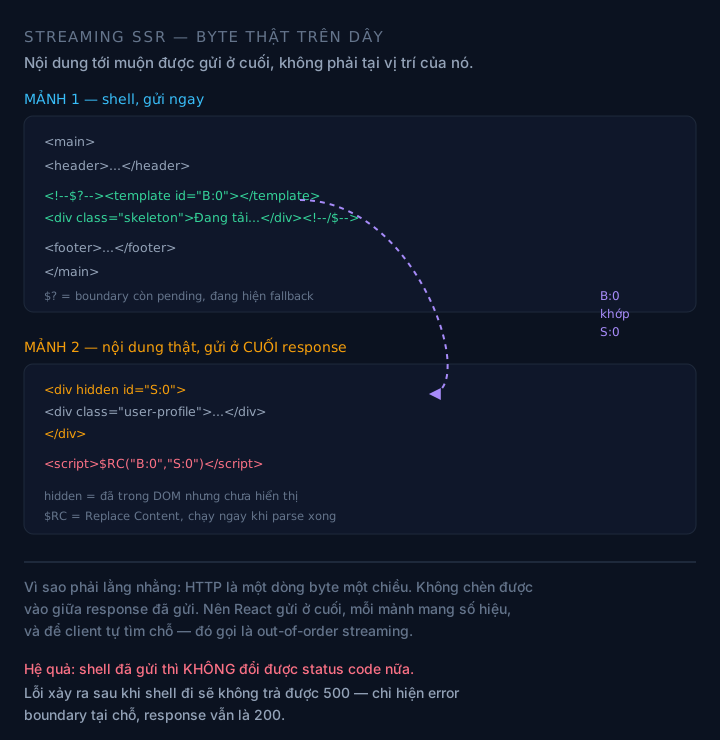
Content that arrives later is sent inside a <div hidden>, then $RC() moves it into the marked spot.
5.1. The first chunk: the shell
React sends the shell first: everything outside a Suspense boundary. Wherever there’s a Suspense, it sends a pair of markers and an empty template:
<main>
  <header>...</header>

  <!--$?--><template id="B:0"></template><div class="skeleton">Loading...</div><!--/$-->

  <footer>...</footer>
</main>
Reading the marker pair:
<!--$?-->:$is React’s marker, and?means this boundary is still pending and showing its fallback.<!--/$-->: closes the boundary.<template id="B:0">: the marked empty slot.Bstands for boundary. The real content gets placed here later.
If the boundary is already done from the start, the marker is <!--$--> with no question mark.
5.2. The later chunk: the real content, at the end of the stream
When the data arrives, React sends more, at the end of the response, not at the boundary’s position in the HTML:
<div hidden id="S:0">
  <div class="user-profile">...</div>
</div>
<script>$RC("B:0","S:0")</script>
Three details:
hidden: the content has reached the browser but isn’t displayed yet. It’s in the DOM, just hidden.id="S:0":Sstands for segment.B:0/S:0are a numbered matching pair.$RC("B:0","S:0"): Replace Content. This script runs as soon as it’s parsed, finds templateB:0, takes the content fromS:0, and puts it into the slot.
5.3. Why all this fuss
Because it’s the only way to stream out of order.
HTTP is a one-way stream of bytes. You can’t insert content into the middle of a response that’s already been sent. If the second boundary finishes before the first, you can’t send it “in position”. That position has already gone by.
So React does the opposite: it sends everything at the end, each piece carrying an ID, and lets the client find the slot. This is called out-of-order streaming, and it’s why a page with 3 data regions taking 300ms, 800ms and 50ms can still show the 50ms region first.
Without this mechanism, streaming would either have to follow strict order (so you’d still wait for the slowest piece ahead of you), or not be possible at all.
5.4. The trap: status codes
A detail that’s easy to overlook, and it causes real bugs:
Once you’ve sent the shell and started streaming, you can no longer change the status code.
The headers are already gone. So if an error happens in a boundary that streams after the shell was sent, you can’t return a 500. The page is still a 200, and only one region shows an error UI.
That’s why real SSR code usually has to decide up front: which errors are serious enough to block the whole response (return 500 before piping), and which should just show an error boundary in place.
6. What React generates HTML with
At the lowest layer, the framework calls one of two react-dom/server APIs.
renderToPipeableStream is for Node.js. It returns { pipe, abort }. You call pipe(response) to start pushing bytes.
import { renderToPipeableStream } from 'react-dom/server'

const { pipe, abort } = renderToPipeableStream(<App />, {
  bootstrapScripts: ['/static/client.js'],
  onShellReady() {
    res.statusCode = didError ? 500 : 200
    res.setHeader('content-type', 'text/html; charset=utf-8')
    pipe(res)
  },
  onShellError() {
    res.statusCode = 500
    res.send('<h1>Something went wrong</h1>')
  },
  onError(error) {
    didError = true
    console.error(error)
  },
})
renderToReadableStream is for Web Streams runtimes (Edge, Workers, Deno, Bun). It returns a Promise of a ReadableStream, and you return that as the body. To wait for everything: await stream.allReady.
6.1. onShellReady and onAllReady are not two ways to call the same thing
Misunderstand this and you get an SEO bug that’s very hard to see.
onShellReadyfires when everything outside Suspense boundaries has rendered. This is the one you use for users: push the shell out immediately, stream the rest later.onAllReadyfires when the whole tree has rendered, every boundary included. This is the one you use for crawlers, static generation, email rendering, social card previews, RSS export.
Why the distinction matters: some crawlers can’t handle streams. They get the shell, see empty content where the boundaries are, and leave. If you stream to Googlebot, you may be sending it a page that looks blank.
The common fix is to branch on user-agent:
const isCrawler = /bot|crawler|spider|crawling/i.test(req.headers['user-agent'] || '')
const { pipe } = renderToPipeableStream(<App />, {
  bootstrapScripts: ['/main.js'],
  onShellReady() { if (!isCrawler) pipe(res) },
  onAllReady()   { if (isCrawler)  pipe(res) },
})
One line from the React docs worth remembering: renderToNodeStream was removed in React 19. If a codebase still uses it, that’s what to migrate first. It doesn’t support Suspense and has no streaming guarantees of any kind.
6.2. Suspense needs a data layer that knows how to suspend
Where many people get stuck building streaming SSR themselves:
useEffect does not suspend. A fetch inside useEffect doesn’t trigger Suspense, doesn’t produce a fallback, and streams nothing. For Suspense to work, the component has to wait on data in a way React understands:
use(): a React 19 API.- Framework primitives: Next’s wrapped
fetch, a router’s loaders. - Libraries with adapters: TanStack Query’s
useSuspenseQuery.
If you wrap <Suspense> around a component that fetches in useEffect, you do get a fallback showing, but it’s just a client-side spinner. The server has nothing to stream.
7. Hydration: the second render
Hydration is the process where React takes the DOM tree that already exists and attaches the logic back to it.
import { hydrateRoot } from 'react-dom/client'
hydrateRoot(document.getElementById('root'), <App />)
Sounds simple. But inside, it does three things, in order:
- Rebuild the whole tree in memory. React runs your component functions again. There’s no way to turn this off.
- Compare against the existing DOM. React walks the real DOM tree and compares it with the tree it just built in memory.
- Attach event handlers. This is the only thing that’s truly needed, but it can’t happen until steps 1 and 2 are done.
Step 1 is why hydration is expensive. The heavier the components, the longer hydration takes, and it blocks the main thread.
It’s also why “reduce bundle size” is the most effective lever for INP in an SSR app. Not only because it downloads faster, but because there’s less code to run again.
8. Selective hydration
The good news: since React 18, hydration doesn’t have to finish entirely before you can interact.
The actual mechanism (from the React team’s discussion):
- Initially, Suspense boundaries are not hydrated. They wait.
- When the user clicks or types into a boundary that isn’t hydrated yet, React intercepts the event in the capture phase and synchronously hydrates exactly that boundary, if its code has already loaded.
- If the code hasn’t loaded yet, React calls
stopPropagation()to block the event, then raises the priority of that boundary. When the code arrives, this boundary hydrates ahead of the others. - Hover and focus also raise priority, but don’t hydrate synchronously. The persistent event list:
focusin,mouseenter,dragenter,mouseover,pointerover. - With no interaction at all, React still hydrates gradually in idle cycles.
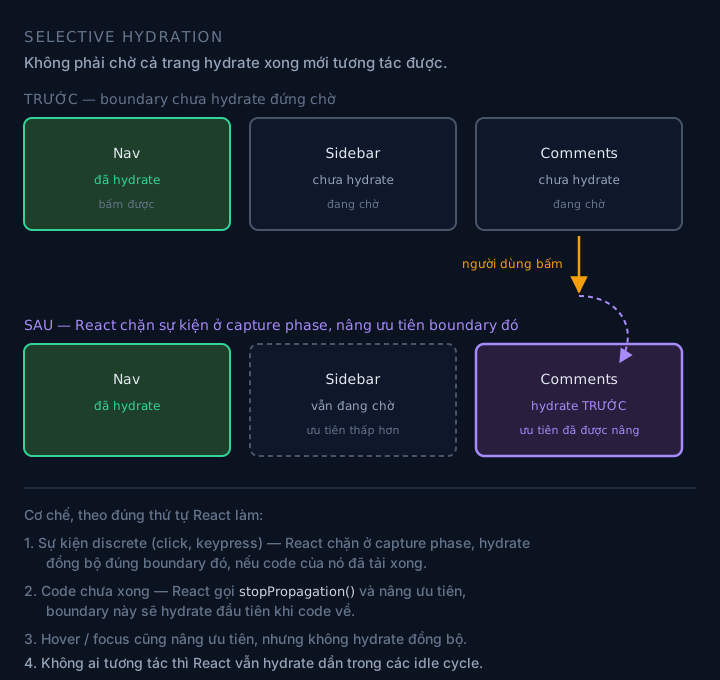
The boundary that gets clicked doesn’t have to wait for the whole page to hydrate.
A practical consequence: a page with a heavy sidebar and a light comment box can have the comment box become interactive first, just because the user clicked it first. That’s correct behavior, and it goes against the intuition of “hydrate top to bottom”.
The condition for benefiting: you need Suspense boundaries. Don’t split into boundaries and the whole page is one block, so selective hydration has nothing to choose from.
9. Hydration mismatch: where it comes from and how to diagnose it
This error is specific enough to deserve its own section, because it only exists when you SSR.
React hydrates by comparing the existing DOM tree with the tree it just rebuilt. If the two differ, you get a mismatch. The cause always comes down to one sentence: something produces different results in the two environments.
| Source | Why it differs | Fix |
|---|---|---|
Date.now(), new Date() | Server and client run at different times | Compute on the server and pass it down, or render only after mount |
Math.random() | Two runs, two results | Generate on the server and pass it down |
localStorage, window | The server doesn’t have them | Read inside useEffect, or check the environment |
Different branches of typeof window !== 'undefined' | The two branches render different trees | Move to state initialized after mount |
| Invalid HTML | The browser fixes the DOM on its own while parsing | Recheck how tags are nested |
| Browser extensions injecting DOM | React sees unfamiliar DOM | Not your bug |
| Timezone / locale | Server is in UTC, client is local | Pin the locale, or render after mount |
The order I use to diagnose:
- Read the error message. React 18/19 points fairly clearly at where the difference is.
- Find everything in the component body that reads from the environment: time, random, storage,
window, locale. - Your first suspect shouldn’t be “that spot”, but the thing that renders that spot. The mismatch usually shows up at the parent node.
suppressHydrationWarningis a painkiller, not a cure. It silences the error on exactly one node, and should only be used for displayed timestamps.
An easy one to forget: SSG hydrates too. A page generated at build time still has to run the components again in the browser. So every mismatch cause above applies exactly the same to a static site, and the bug shows up later, after the build.
10. What SSR costs
Now the part that the “SSR is faster” posts tend to skip.
Server CPU. Every request is one React render in Node. For a page with 100,000 views a day, that’s 100,000 runs of the component tree. CSR doesn’t have this cost: the user’s browser pays it.
Higher TTFB. SSR has to wait for data before sending the first byte. CSR sends empty HTML immediately. If you only measure TTFB, SSR always loses. That’s why TTFB alone is a poor metric for judging SSR.
Streaming needs infrastructure that can stream. Buffering in a proxy kills the whole benefit. Compression has to be streaming compression. The CDN must not gather the response up. This is a silent kind of bug: the code is right, the infrastructure is wrong, and all you see is that it’s slower than expected.
Not everything can stream. You need a data layer that can suspend (section 6.2). You need Suspense boundaries in the right places. And you have to accept that the status code is locked in once the shell goes out.
More complexity. Not in one place but three: server, client, and the boundary between them. A bug can now live in either environment.
11. Choosing by actual cost
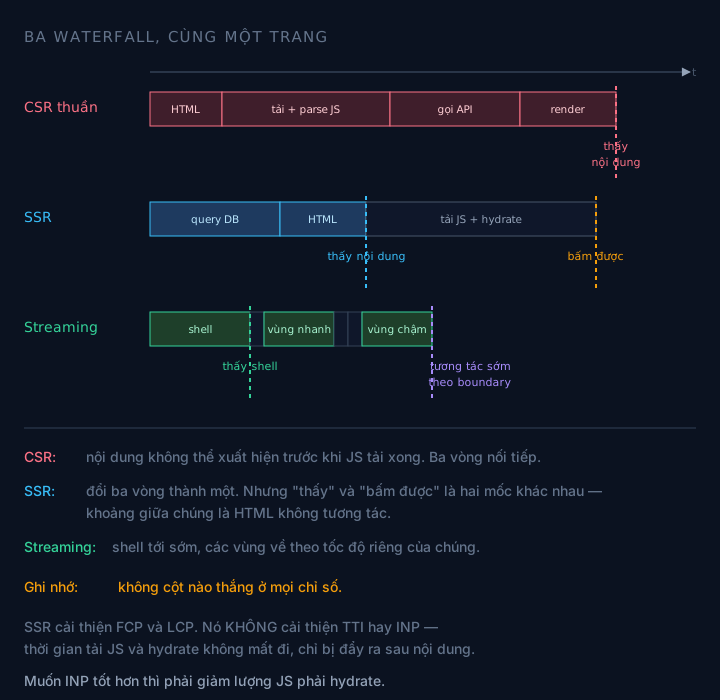
The same page, four ways to pay. No column wins on every metric.
| Strategy | FCP / LCP | TTI / INP | TTFB | Server cost | Fits |
|---|---|---|---|---|---|
| CSR | Poor | Poor | Best | None | Logged-in apps, no SEO needed |
| SSR | Good | Poor | Poor | High (per request) | Constantly changing content, needs SEO |
| Streaming SSR | Good | Better than SSR | Poor | High | Pages with several data regions at different speeds |
| SSG | Best | Poor | Best | Near zero | Rarely changing content, heavy traffic |
| ISR | Best | Poor | Best | Very low | Content that changes on a schedule |
| PPR | Best (shell) | Better than SSR | Good | Low + the dynamic parts | Static shell, a few personalized holes |
Three things I take from this table:
No column wins on every metric. SSG wins FCP and TTFB but loses INP just like SSR. CSR wins TTFB and loses everything else. Choosing means choosing what you’re willing to lose.
Streaming doesn’t improve FCP. The shell still has to finish rendering before it’s sent. It improves perceived speed and when each content region appears, along with earlier interactivity through selective hydration.
PPR is SSG plus streaming. It’s not a seventh strategy. It’s “SSG shell, streaming holes”, and that’s why it wins on the FCP row.
12. What to measure, and where
Three metrics, three different questions. Measure the wrong one and you optimize the wrong thing.
- TTFB: when the server returns the first byte. High means the server or network is slow. With SSR, high TTFB is normal and not necessarily bad.
- FCP / LCP: when the user sees content. This is the metric SSR improves. To go faster still, cut the data that blocks the shell and push it into Suspense.
- INP: when the page responds to interaction. This is the metric SSR does not improve. To go faster, reduce the JS that has to hydrate.
The diagnostic questions I use:
- Is it slow on content or on interaction? Content: SSR/streaming/SSG. Interaction: bundle size and the number of client components.
- How many independent data regions are there? If two or more, at different speeds, they should sit in separate Suspense boundaries.
- Is the HTML being buffered? Check the response in DevTools: if all the HTML arrives as one lump instead of in pieces, the infrastructure is gathering it up.
- How long does hydration take? Chrome Performance, look at the Main track after the JS loads. If it takes most of the time, the problem is the bundle, not the render.
13. A few things to remember
- SSR is a round-trip problem, not a speed problem. It buys time with fewer network trips, and pays with server CPU. Understand that and every other choice becomes clear.
- Early content ≠ early interaction. Two different moments, two different metrics, two different ways to optimize. Mixing them up is behind most bad decisions.
- Hydration is the second render, and it isn’t free. Everything in the component body runs again on the main thread of a weak device. Keeping components light is an engineering requirement, not an aesthetic one.
- Streaming is a technique for stitching content together, not for sending it fast.
<!--$?-->,<template id="B:0">,$RC()exist because HTTP is a one-way stream of bytes and you can’t insert into the middle. - A Suspense boundary is a unit of work, not decoration. It decides what shows first, and what hydrates first when the user clicks.
- SSG hydrates too. If you think a static site has no client problems, you’ll meet the whole mismatch list from section 9 again, just later.
What I haven’t been able to measure is the tipping point of streaming. More boundaries isn’t always better: I’ve seen a page split into 8 boundaries make more trips back to the server and get worse INP than leaving it as one block, because each boundary brings its own hydration pass. I haven’t found a rule to predict that number. If you’ve run into it and measured it, I’d like to hear.
What this post rests on
- The
renderToPipeableStream/renderToReadableStreamAPIs, the semantics ofonShellReady/onAllReady/onShellError/onError, and the removal ofrenderToNodeStreamin React 19: per the Reactreact-dom/serverdocs. - The wire format (
<!--$?-->,<template id="B:0">,<div hidden id="S:0">,$RC("B:0","S:0")): checked against the real HTML output of an app using streaming SSR. - The selective hydration mechanism (capture phase,
stopPropagation(), priority raising, the persistent event list, hydrating in idle cycles): per the React 18 team’s official discussion. - Limits: this is internals, not an API contract. The marker names and the
B:/S:numbering are implementation details and have changed between versions. Use them to understand and to read DevTools, don’t parse them in code. - The round-trip and LCP numbers in this post are estimates from a 4G network at about 100ms RTT, not measurements from a specific app. For real numbers you have to measure your own app.
- The streaming mechanism here describes the React layer. How Next.js wraps it with an extra Flight layer and
self.__next_f.pushis in my Next.js 16 post.
Keep reading
Need a developer for a contract or freelance project?
I take on fullstack projects — Go backends, React/Next.js frontends, or both ends. Send a few lines about the scope and timeline and I'll reply within 48 hours.