Inside Next.js: Why RSC, Streaming and Cache Components Exist
Bài này có bản tiếng Việt. Đọc bản tiếng Việt →

Nguyen Hai Trinh • Senior Software Engineer @ SmileViet

Next.js isn’t a framework built from nothing. At its core it’s React plus an operational layer: a server, a router, a bundler, and a rendering model.
But there’s a question underneath all of it, and I’ve noticed very few people can answer it:
Why can React do SSR?
Not “how do I turn SSR on”. The real question: React was written to run in the browser and update the DOM. So how does it run in Node and produce a string of HTML? What was designed to allow that?
Once you can answer this, every other Next.js feature falls into place, because they’re all consequences of the same architecture.
So the post follows that order. Part 1 is the foundational answer. The parts after it cover one feature at a time, each in the same mold: what problem → why the old way wasn’t enough → what it solves → what it takes away.
1. Why React can do SSR: because React doesn’t know about the DOM
The answer lies in an architectural decision from React 16, and it isn’t about “adding a render API”.
A React element is a plain JavaScript object. Not a DOM node, not a string. At the lowest level, your whole UI tree is just data:
// A React element is really just this
{ type: 'div', props: { className: 'box', children: [...] } }
Because it’s data, you can hand it to anything that knows how to read that data and turn it into something else. And React has several such things.
1.1. Three renderers, not one
This is worth resetting your beliefs about. The react-dom you import in your app is the client renderer. But react-dom/server isn’t “the same thing running in Node”. It’s a different implementation.
I downloaded [email protected] from npm and counted with grep -o <name> <file> | wc -l:
react-dom-client.development.js        (client)
    beginWork             4
    completeWork          2
    performUnitOfWork     3
    workLoopConcurrent    2

react-dom-server.node.development.js   (server)
    beginWork             0
    completeWork          0
    performUnitOfWork     0
    workLoopConcurrent    0
    ───────────────────────
    Segment             316
    Request              48
    pingTask              5
    writeChunk          172
Read down the column: all four Fiber names are zero on the server. The reverse holds too: Segment, pingTask and writeChunk never appear in the client build. The two sides don’t share machinery.
Not a single line of Fiber in the server build. No beginWork, no completeWork, no workLoopConcurrent. No fiber tree, no pair of current/workInProgress trees, no lanes.
So what does the server build have? An entirely different model: Request → Task → Segment.
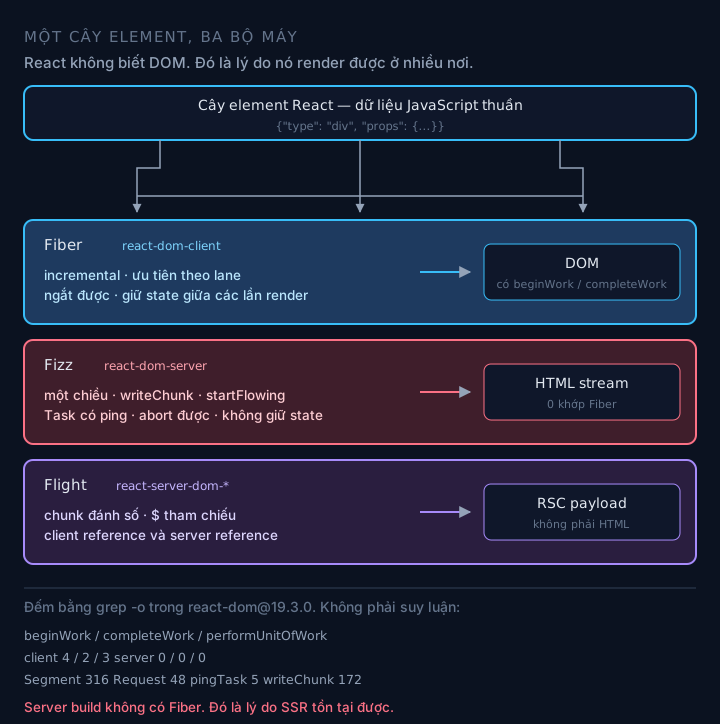
One element tree, three different engines producing different output.
The three renderers are:
- Fiber (
react-dom-client): outputs the DOM. It has incremental rendering, priorities, can be interrupted midway, and keeps state across renders. - Fizz (
react-dom-server): outputs an HTML string/stream. One direction, never goes back, keeps no state. - Flight (separate packages:
react-server-dom-webpack,react-server-dom-turbopack,react-server-dom-parcel, all 19.3.0): outputs an RSC payload. Not HTML.
react-dom contains no Flight at all (0 matches). It’s an independent package, exactly as designed.
1.2. Why three and not one
Because the requirements of the three environments pull in opposite directions, and trying to make one thing serve all three is the surest way to make it bad at all three.
Fiber has to do things Fizz doesn’t need. Fiber updates a live DOM. It has to hold state between renders (your state lives on the fiber, not in a closure). It has to prioritize: a click before a transition. It has to be interruptible and restartable. It has to double-buffer so it can throw away a half-built tree.
Fizz needs none of that. Server rendering is one-directional: walk top to bottom, write bytes, never go back to edit. There’s no user state to keep. There are no interactions to prioritize. There’s no “re-render”, only one pass. And a fiber tree is a heavy data structure tied to a long browser lifetime. Throwing it into every server request means paying for something nobody uses.
Strip out all of Fiber’s requirements and Fizz becomes simple enough to exist. That’s the whole answer to “why can React do SSR”.
1.3. Evidence: Fizz thinks in Tasks, not in a tree
I opened the server build file, and this is the real task structure (trimmed):
// react-dom-server.node.development.js — the real task object, field names kept as is
var task = {
  node,                 // the node being rendered
  childIndex,
  ping: { resolve, reject },   // <-- this part matters
  blockedBoundary,             // the Suspense boundary blocking it
  blockedSegment,
  abortSet,                    // tasks can be aborted
  keyPath,
  context,
  treeContext,
  thenableState,
}
The entry function of the entire server renderer:
function createRequest(
  children, resumableState, renderState, rootFormatContext,
  progressiveChunkSize, onError, onBrowserBailout,
  onAllReady, onShellReady, onShellError, onFatalError, formState
)
Look closely at ping. When a component suspends, meaning it throws a promise, Fizz doesn’t block. It registers two callbacks, resolve/reject, on that promise, bumps a counter, and moves on to another node.
request.allPendingTasks++
blockedBoundary === null
  ? request.pendingRootTasks++
  : blockedBoundary.pendingTasks++
That’s the whole secret of streaming SSR. When the promise resolves, pingTask runs, that task continues, and its output gets written by writeChunk as a new piece. When pendingRootTasks drops to 0, the shell is done, onShellReady fires, and startFlowing starts pushing bytes.
Since Fizz holds no tree, it needs no “place” for the new piece. It just writes to the end of the stream and calls $RC() so the client stitches it in. I covered that detail in my SSR post.
Three renderers, three faces of the same element tree. Now back to Next.js.
2. Origin: CSR is slow because of a three-round waterfall
The whole story starts here, so it has to be told right.
With pure CSR, loading a page is three sequential rounds: load empty HTML → load the JS bundle → call the API. No round overlaps another, because each needs the result of the one before.
The real consequence: content can’t appear before the JavaScript finishes loading. Everything else, bad LCP, poor SEO, the flash of loading, is just a symptom of that one cause.
SSR was born to cut three rounds down to one. The server runs React, has the data ready, and sends complete HTML.
Content arrives after one round instead of three, so FCP and LCP improve noticeably. In exchange, TTFB goes up, since the server has to wait for data before sending the first byte. And a new concept appears: hydration.
This is exactly where the problem that makes every later Next.js feature exist shows itself.
3. Classic SSR: all or nothing
Classic SSR, the renderToString era, has a brutal property:
The slowest part of the page decides the timing of everything.
The server has to finish the entire tree, wait for all the data, and only then write the first byte. If your header renders in 5ms but a “recommended products” block needs 800ms, the user waits 800ms to see, the header.
You can’t send the header first, because renderToString returns a string. A string only exists once it’s complete. And you can’t change the status code afterwards either, since nothing was sent yet.
The problem isn’t that React is slow. It’s that the API has only one output shape: a complete string.
3.1. Streaming changes the output shape
React 18 added renderToPipeableStream next to renderToString, and changed the output shape from “string” to “stream”.
A detail that’s easy to get wrong, so let me be explicit: renderToString was not removed. It still lives in react-dom-server-legacy in React 19.3.0. It just doesn’t support Suspense. That very file has the warning “which does not support Suspense. If you intended to have the server wait for the suspended component please switch to…”. So if you still use renderToString and wonder why <Suspense> does nothing, that’s the answer.
This is possible only because Fizz thinks in Tasks. Every region waiting on data is a task with a ping. The server doesn’t block. It writes the shell first, then writes another piece each time a task finishes.
flowchart TD
    A["renderToPipeableStream"] --> B["createRequest(...)<br/>registers onShellReady, onAllReady"]
    B --> C["renderNodeDestructive<br/>walks node by node"]
    C --> D{"Does the component<br/>suspend?"}
    D -->|No| E["writeChunk immediately"]
    D -->|Yes| F["create a Task with ping<br/>do NOT block, move on"]
    E --> G{"pendingRootTasks<br/>reached 0?"}
    F --> G
    G -->|Yes| H["onShellReady<br/>startFlowing — start sending"]
    G -->|Not yet| C
    F -.->|"promise resolves"| I["pingTask<br/>task continues"]
    I --> J["writeChunk new piece<br/>+ $RC() script"]

    style F fill:#3b2f1e,stroke:#f59e0b,color:#fff
    style H fill:#1e3f2f,stroke:#34d399,color:#fff
The fastest part of the page is no longer held hostage by the slowest. The shell shows up within a few dozen ms, and later regions arrive at their own speed.
The price is three things, and all three cause real bugs.
- The status code is locked in early. Once the shell is sent, it can’t change. An error that happens later can’t return a 500. It only shows an error boundary in place, and the response stays 200.
- Crawlers need a separate path. Some bots can’t handle streams. So you have to branch: users get
onShellReady, bots getonAllReady. - Infrastructure has to understand streams. Proxy buffering, non-streaming compression, a CDN that collects the whole response: any of the three kills the benefit. This kind of bug is silent: the code is right and the infrastructure is wrong.
A prerequisite many people overlook: Suspense needs a data layer that knows how to suspend. useEffect doesn’t suspend. A fetch inside useEffect creates no fallback, so there’s nothing for the server to stream. You need React 19’s use() or a framework primitive.
4. Streaming doesn’t fix the JavaScript volume
Streaming solves the timing problem. It doesn’t solve the volume problem.
Even if the HTML arrives early, the browser still has to download the JS of every component to hydrate. For an e-commerce page, that’s a bundle containing components the user has never even seen. And hydration is a second render: the components run again on a phone’s main thread.
That is the problem RSC was created to solve.
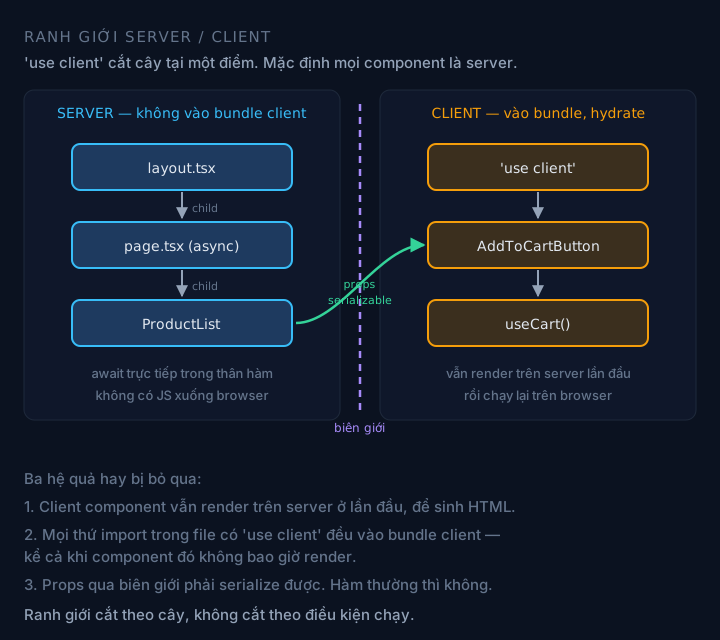
'use client' cuts the tree at one point. Everything imported in that file goes into the client bundle, even if it’s never rendered.
4.1. Drop the code, keep the result
The idea: if a component is only used to render content and needs no interaction, why send its code down to the browser?
A server component runs on the server, and the browser receives only the result, not the code. That component doesn’t exist in the client bundle. The heavy markdown library, the ORM, the internal SDK all stay on the server.
That’s the core difference from SSR. SSR sends rendered HTML but still sends the code to hydrate. RSC sends rendered HTML and no code.
The client bundle gets smaller, sometimes a lot smaller. Hydration has less work. Data fetching moves closer to the data.
In exchange, three new things to manage:
- A new boundary to manage.
'use client'cuts the tree at one point. Put it in the wrong place and you pull a whole subtree into the client bundle. - Serialization has to be designed. Props crossing the boundary go through the Flight protocol, so they must be serializable.
- A new attack surface. Flight deserializes payloads sent by the client. In December 2025, CVE-2025-55182 exploited exactly this: CVSS 10.0, unauthenticated remote code execution. Patched in React 19.0.1 / 19.1.2 / 19.2.1.
A common misunderstanding to clear up: RSC doesn’t replace SSR. Client components are still SSR’d on first load to produce HTML, and then still hydrate. RSC and SSR are two layers, not two options.
4.2. Flight: why a separate protocol
An RSC tree contains components, promises, module references, and you can’t JSON.stringify that. So React needs its own format.
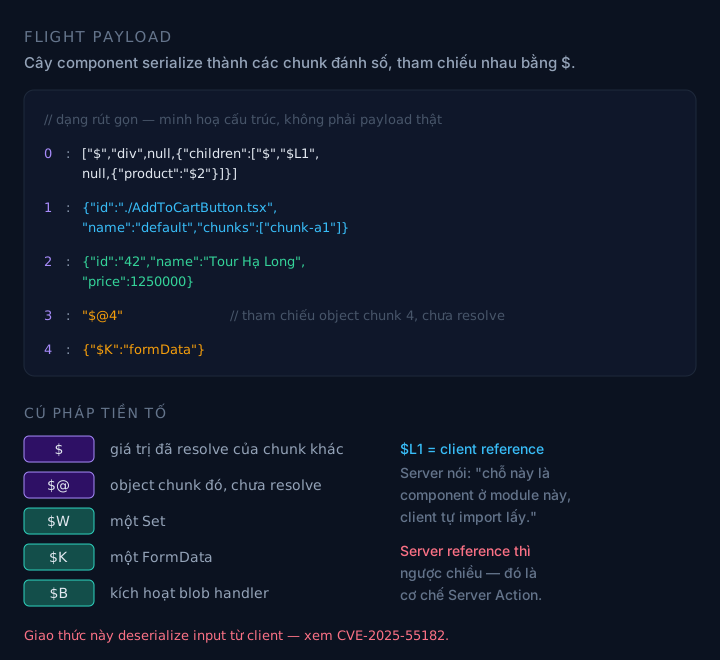
Chunk 0 holds the shape of the tree. The later chunks carry the real data, referenced with $.
flowchart LR
    A["Server component tree"] --> B["Flight serializes<br/>into numbered chunks"]
    B --> C["$ references another chunk"]
    B --> D["$L1 = client reference<br/>'client imports this module itself'"]
    B --> E["$K = FormData, $W = Set,<br/>$@ = not yet resolved"]
    C --> F["HTML stream<br/>self.__next_f.push"]
    F --> G["Client: React assembles the tree<br/>+ imports client components"]

    style B fill:#2a1e3f,stroke:#a78bfa,color:#fff
Tell the two reference directions apart, because this is where people mix them up:
- Client reference: the server tells the client “this spot is a component in module Y, go import it”. This is the path client code travels down.
- Server reference: the client tells the server “run function Z”. This is the Server Action mechanism.
5. Data and components get separated
This problem is older than RSC and dates back to the Pages Router.
In getServerSideProps, data is fetched in a separate function, then passed to the component through props. The component has no idea where the data comes from. To change how data is fetched you edit two places. And everything has to wait for that function to finish before rendering starts. No Suspense, no streaming, because rendering hasn’t even begun.
The problem isn’t syntax. It’s that data and UI are pulled apart, and the server loses the ability to stream because it has to wait for everything before painting a single pixel.
The App Router lets you fetch right inside the component, and since the component is async, <Suspense> becomes the natural boundary for streaming.
What you gain is colocation, where the data fetch sits next to its use, and streaming becomes the default structurally.
What you lose is seeing all of a page’s data in one place. To know which APIs a page calls, you have to read the whole component tree. For someone new to the project, that’s a real step backward.
6. Changing data without rebuilding
SSG gives the best speed: the HTML is already there, nothing to render. But it carries an assumption: the content doesn’t change.
With a product page of 50,000 items, every price change means rebuilding everything. Not feasible.
ISR solves that: the page is generated at build time, served statically, and refreshed in the background at an interval.
It keeps SSG’s speed without rebuilding. The cost is predictability: between two revalidations, someone sees stale data. Not wrong, but you have to accept it and choose the interval correctly.
6.1. PPR: when a page is both static and dynamic
ISR is still “the whole page static” or “the whole page dynamic”. But in reality most pages are a mix: header, menu, and product frame are static; price by exchange rate, inventory, and cart are dynamic.
Before PPR, you picked one and lived with the consequences: either the whole page static but not personalizable, or the whole page dynamic and losing static speed.
PPR cuts it in half: the shell is built at build time, the holes stream at request time.
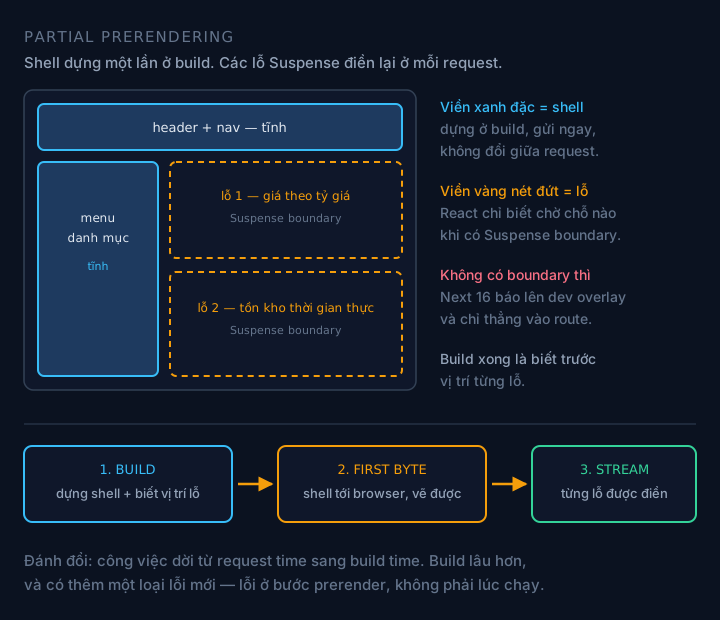
The shell doesn’t change between requests. Only the holes get filled again.
flowchart LR
    A["BUILD<br/>build the shell<br/>hole positions known up front"] --> B["REQUEST<br/>send the shell immediately"]
    B --> C["STREAM<br/>each hole filled separately"]

    style A fill:#1e3a5f,stroke:#38bdf8,color:#fff
    style C fill:#1e3f2f,stroke:#34d399,color:#fff
The shell’s FCP matches SSG, and the dynamic regions can still be personalized. What you lose is simplicity. Next 16 is fairly strict: any component that can’t finish during the prerender step gets flagged in the dev overlay, pointing straight at the route, with three ways to fix it. That means upgrading will break builds in places that used to just be quietly slow. That’s intentional, but it’s still work you have to do.
7. Implicit caching can’t be predicted
The most painful lesson of Next.js, and I think it deserves its own section.
Next 14 has four cache layers, and every layer is implicit: Request Memoization, Data Cache, Full Route Cache, and the client-side Router Cache. You have to guess what’s being cached, and the only way to find out is to try.
The consequence is a very annoying class of bug that I described at the start of this post: the data on the server is already correct, but the browser keeps serving the old payload. No layer reports an error, because no layer has an error. One cache layer is just doing its job at the wrong time.
Next 15 started pulling this apart: fetch is not cached by default, GET route handlers are not cached by default, the client router cache is not cached by default. Three breaking changes in a minor release.
Next 16 reverses it completely.
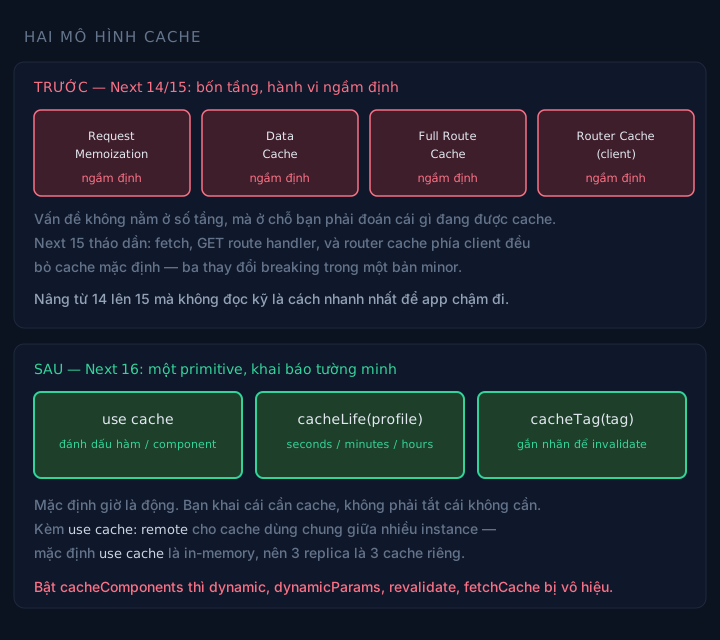
Old: the framework guesses. New: you declare.
async function getProducts() {
  'use cache'
  cacheLife('hours')
  cacheTag('products')
  return db.product.findMany()
}
The default is now dynamic. You declare what to cache instead of turning off what you don’t need. Reading the code tells you what’s cached.
Two things get taken away, and both are worth noticing:
use cacheis in-memory by default. Run three replicas and you get three separate caches. To share, you have to declareuse cache: remoteand configure a cache handler. This is the source of “sometimes right, sometimes wrong” bugs that are very hard to reproduce.- A bunch of familiar config stops working. Turn on
cacheComponentsanddynamic,dynamicParams,revalidate,fetchCacheno longer take effect, andexperimental_ppris removed. There’s a codemod, but this is the kind of change where you have to re-read every route.
7.1. And the problem of the invalidation mechanism itself
Four cache layers means four ways to refresh, and picking wrong makes the bug silent again.
flowchart TD
    A["Source data changes"] --> B{"Changed from where?"}
    B -->|"in a Server Action,<br/>user is waiting"| C["updateTag(tag)<br/>read-your-writes"]
    B -->|"webhook, cron,<br/>nobody waiting"| D["revalidateTag(tag, profile)<br/>stale-while-revalidate"]
    B -->|"only need to refresh<br/>the client-side cache"| E["refresh()"]

    style C fill:#1e3f2f,stroke:#34d399,color:#fff
    style D fill:#1e3a5f,stroke:#38bdf8,color:#fff
    style E fill:#3b2f1e,stroke:#f59e0b,color:#fff
The reason there are three different APIs and not one: two different contexts need two different behaviors.
A user who just clicked “save” needs to see the new data right away. If you serve them stale data and refresh in the background, they’ll think the save failed. That’s updateTag.
A webhook from the CMS has nobody waiting. Refreshing in the background and serving stale data in the meantime is the better behavior, because nobody has to wait. That’s revalidateTag.
The third case: the server data is already correct and only the browser still holds an old payload. No need to touch the server cache, just refresh().
Note the signature: in Next 16, revalidateTag requires two arguments. The one-argument version is deprecated.
8. Mutations and the price of an API endpoint
Before Server Actions, adding a product to the cart needed: writing a route handler, fetch from the client, managing useState for loading/error, then calling revalidate yourself afterwards. Four places for one operation.
A Server Action shrinks it to one thing:
<form action={addToCart}>
  <button type="submit">Add to cart</button>
</form>
Four places merged into one. More importantly, it works before React hydrates, and even with JavaScript turned off.
8.1. Why progressive enhancement comes free
Because a Server Action isn’t magic. It compiles to a real HTTP endpoint. It only accepts POST. The action ID goes in the Next-Action header.
And <form action={...}> is a real form, so the browser can submit it the classic way. No JS needed. That’s the technical reason to prefer action={} over onClick={() => addToCart()}. It isn’t a matter of taste.
sequenceDiagram
    autonumber
    participant C as Client
    participant N as Next server
    C->>N: POST to the same page URL
    Note over C,N: header Next-Action: action id<br/>body multipart/form-data, Flight chunks
    N->>N: look up action id in the manifest
    N->>N: compare Origin with Host — CSRF protection
    N->>N: deserialize, decrypt the closure
    N->>N: run the function
    N-->>C: new RSC payload for the changed tree
8.2. What the framework handles and what it doesn’t
Next handles out of the box: POST only, comparing Origin with Host, action IDs that can’t be guessed and rotate between builds, encrypted closures, and unused actions stripped from the client bundle.
Next does not handle: authentication, authorization, input validation, rate limiting, controlling what the action returns.
Two subtle points worth remembering:
- Closure encryption protects against tampering, not against exposure. It stops the client from changing closure values. It doesn’t make a closure a safe place for secrets.
- “Unused actions are stripped from the bundle” is only true for actions that aren’t exported. An
exported action still has an endpoint, even if no UI calls it.
Put simply: treat every Server Action as a public API, because that’s exactly what it is.
9. Three operational problems
The remaining three features aren’t part of the rendering logic chain. They solve three different operational problems.
Middleware runs in a runtime that’s too limited. The old middleware defaulted to the Edge runtime, with a restricted API and no access to a lot of Node. Next 16 renames it proxy.ts and runs it on the Node.js runtime by default. Next’s reason is quite blunt: the name middleware sounds like a processing layer inside the app, when it’s actually an intercept at the edge. proxy describes it better. Note: the runtime config can no longer be used in a proxy file, and setting it will error.
Slow builds. In a big monorepo, next build takes tens of minutes and the dev loop falls apart. Turbopack solves it with incremental computation: each compile step is a pure function of its input, cached by input. Change one file and only the steps whose input changed re-run. And it’s not just “webpack written in Rust”. If it were, there’d be nothing to discuss.
Navigation eats bandwidth. A page with 50 product links sharing one layout: before, the layout got downloaded 50 times during prefetch. Next 16 adds layout deduplication (download once) and incremental prefetching (only fetch what’s not in the cache, cancel when the link leaves the viewport, prioritize on hover).
10. The causal chain
If you remember only one thing from this post, remember this: every Next.js feature sits on one single causal chain, not a scattered list of features.
flowchart TD
    A["CSR: content waits for JS<br/>3-round waterfall"] --> B["SSR: 3 rounds become 1<br/>but waits for all data"]
    B --> C["Streaming: Fizz has Task + ping<br/>shell sent first, holes stream later"]
    C --> D["Still a problem: sends the code<br/>of every component to hydrate"]
    D --> E["RSC: components run on the server<br/>browser gets the result, not the code"]
    E --> F["Needs its own protocol<br/>to serialize the tree -> Flight"]
    F --> G["A new boundary<br/>-> use client, and a CVE"]
    C --> H["Still a problem: static or dynamic<br/>is a binary choice"]
    H --> I["PPR: static shell + dynamic holes"]
    I --> J["Needs explicit caching<br/>-> use cache, cacheLife, cacheTag"]

    style A fill:#3f1e2b,stroke:#fb7185,color:#fff
    style E fill:#2a1e3f,stroke:#a78bfa,color:#fff
    style I fill:#1e3f2f,stroke:#34d399,color:#fff
Read from the top down: every arrow is a problem that the next feature was born to solve, and also a new problem that feature creates.
11. Choosing tools: when to use what
This table is a consequence of the chain above, not a list to memorize.
| You need | Use | Why |
|---|---|---|
| SEO + constantly changing content | SSR / streaming | Content has to be in the first HTML |
| Several data regions with different speeds | Streaming + multiple Suspense boundaries | Fast regions don’t wait for slow ones |
| Client bundle too large | RSC, push use client down low | Code that isn’t sent doesn’t need to hydrate |
| Static shell + a few personalized holes | PPR | SSG’s FCP, with dynamic data still correct |
| Rarely changing content, heavy traffic | SSG / ISR | Nothing to render |
| Post-login app, no SEO needed | CSR | Simplest, none of the layers above needed |
| Mutations from a form | Server Action | Progressive enhancement for free |
12. Version table and security
| Version | Release date | Highlights |
|---|---|---|
| 16.0.0 | 2025-10-22 | Turbopack default, PPR stable, proxy.ts, Cache Components |
| 16.1.0 | 2025-12-18 | Turbopack FS cache for dev stable, next dev --inspect |
| 16.2.0 | 2026-03-18 | Build Adapters stable |
| 16.3.0 | 2026-08-03 | Dev memory down by up to ~90%; Turbopack cache for next build on by default |
| 16.4.0 | 2026-10-06 | Latest stable release at the time of writing |
Next.js 15 reaches end of life on 21/10/2026, two weeks from when I’m writing this.
Since July 2026, Next ships security fixes on a monthly schedule announced in advance, plus out-of-band releases for severe bugs. A few recent milestones:
- 16.2.6 (05/2026): 13 advisories, including DoS in Server Components, proxy bypass via segment-prefetch, dynamic route parameter injection, SSRF in WebSocket upgrade.
- 16.3.3 (25/08/2026): two critical RCEs: AVIF image optimization and Windows servers.
- 16.3.6 (22/09/2026): critical RCE in
ImageResponseofnext/ogon Node.js. - 16.3.8 / 15.5.27 (30/09/2026): nine vulnerabilities: one critical, two high, five medium, one low.
The biggest one: CVE-2025-55182, disclosed on 03/12/2025, CVSS 10.0. The root cause is that the Flight protocol deserializes client payloads without checking property ownership, so an attacker can run code on the server with a single hand-crafted HTTP request, no authentication needed.
Two details about this bug that are easy to get wrong:
- CVE-2025-66478 is the same bug, not a second one. It was initially filed separately for Next.js, then marked as a duplicate and rejected. Don’t count it as two advisories.
- The fix isn’t only in React. React: 19.0.1, 19.1.2, 19.2.1. Next.js: 16.0.7, 15.5.7, 15.4.8, 15.3.6, 15.2.6, 15.1.9, 15.0.5. If you upgrade React without upgrading Next.js (or the other way round), you’re still exposed.
The blast radius isn’t small: an estimated 39% of scanned cloud environments had workloads affected, and it was added to CISA’s Known Exploited Vulnerabilities list.
That’s the flip side of section 4. A protocol that lets the browser talk to the server with complex data structures is also a protocol that has to deserialize untrusted input. With RSC, this will happen again. Your plan should assume so.
13. What I took away
- Next.js is React plus an operational layer. When stuck, go back to the question: does this belong to React or to the operational layer? Most bugs live in the operational layer, but most misunderstandings live in React.
- Every feature is a consequence of a specific problem. If you can’t remember a feature, ask what it was born to solve. There’s always an answer, and it’s always in the chain in section 10.
- Fizz isn’t Fiber. Understand this and you understand why streaming is feasible, why Suspense needs a data layer that can suspend, and why the server has no state to keep.
- Streaming isn’t free, it changes where you pay. From “the user waits” to “the infrastructure has to understand streaming”. If your proxy buffers, you pay both.
- RSC doesn’t replace SSR. The misunderstanding that costs the most time. Client components still SSR on first load and still hydrate. RSC cuts code, not hydration.
- Next 16 defaults to dynamic. If you’re adding config to turn caching off, you may be carrying the old model over.
One thing I haven’t been able to verify: how use cache: remote behaves across multiple regions. On paper, cacheLife decides propagation time. In practice, I’ve seen propagation delay between regions longer than the cacheLife I set, and the final fix lived in infrastructure, not code. I don’t have measurements to conclude anything.
Notes on sources
- The three-renderer section is direct counts, not inference. Method: download
[email protected]from npm, then count each function name withgrep -o <name> <file> | wc -l. The numbers in section 1 are reproducible, and if you count yourself you’ll get the same. - A mistake I made and fixed while reviewing this post: the first time I mixed two different counting methods (
grep -ccounts lines containing the name,grep -o | wc -lcounts occurrences), so the numbers weren’t reproducible. All numbers in the post now use a single counting method. - The three Flight packages (
react-server-dom-webpack,-turbopack,-parcel) are all at 19.3.0, and the stringFlightdoesn’t appear in any file of thereact-dompackage. That’s also a count result, not inferred from docs. - Next.js version numbers and release dates come from the npm registry, not from the blog.
- Cache behavior,
proxy.ts,cacheComponents,use cache,revalidateTag/updateTag/refresh, and route segment config being disabled when Cache Components is on: per the official docs atnextjs.org/docs. - Security milestones (16.2.6, 16.3.3, 16.3.6, 16.3.8) follow Next.js security announcements. CVE-2025-55182 follows the React advisory; the details of CVE-2025-66478 being rejected as a duplicate and the list of Next.js patch versions follow the advisories from Unit 42 and Google Cloud.
- Limits: Next.js ships monthly. Everything in this post is accurate as of writing, but the cache and prefetching parts change fastest. The Turbopack memory figure for 16.3 comes from Next’s own release post; the other performance numbers are quoted from roundup blogs and I haven’t re-measured them myself.
- This is internals, not public API. React only commits to keeping the API surface stable:
useState,createRoot,useEffect. File names, function names inside the reconciler, and the.next/structure can change in any release. Use them to understand, and don’t build abstractions on top of them. - The byte-level streaming mechanics (
<!--$?-->,<template id="B:0">,$RC()), hydration, and selective hydration I analyzed separately in my SSR post.
Keep reading
- Why SSR? Where React Renders, How Streaming Works, and What It CostsEngineering Deep Dive
- Optimizing React Server Components and the Next.js App Router for a Fast E-commerce StorefrontEngineering Deep Dive
- TradingView Advanced Charts + Web Workers: From Tick to Candle, Frontend and BackendEngineering Deep Dive
Need a developer for a contract or freelance project?
I take on fullstack projects — Go backends, React/Next.js frontends, or both ends. Send a few lines about the scope and timeline and I'll reply within 48 hours.